A familiar name.
Before the need arises.
Reach local customers in the businesses they already visit.
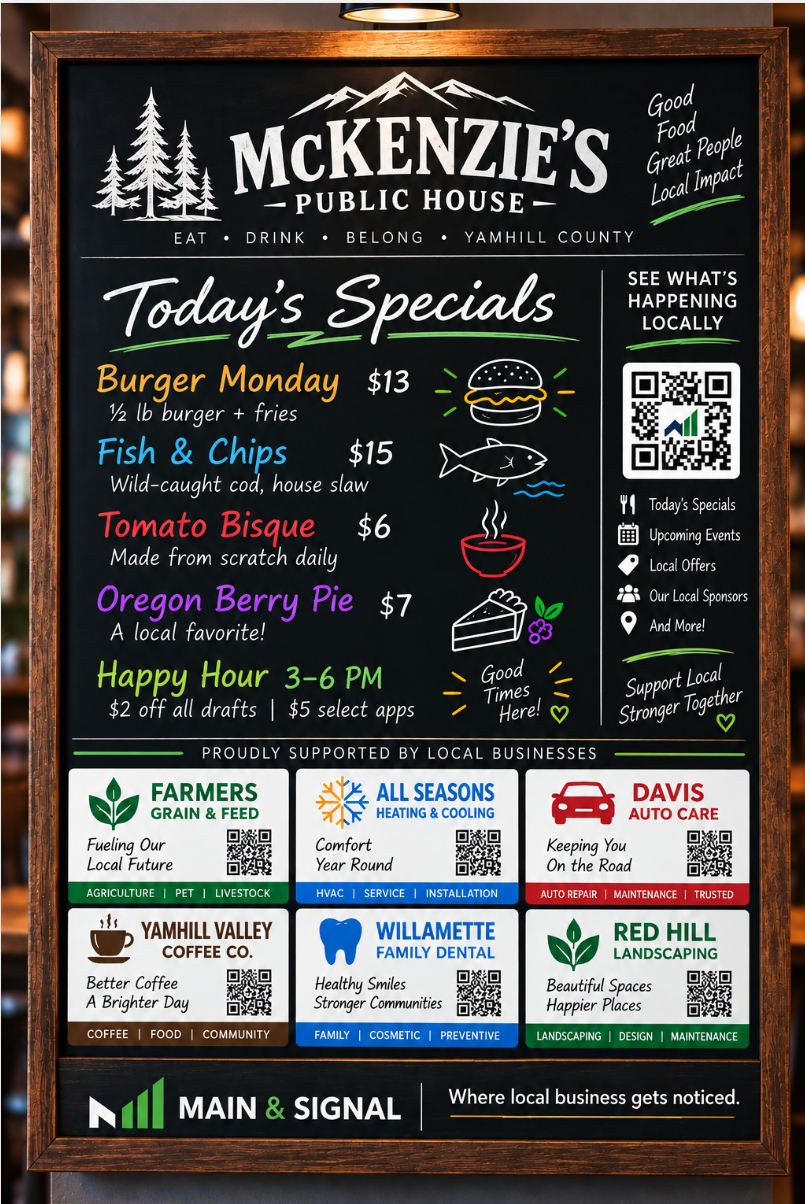
Your business appears on a professionally designed specials board inside a participating local venue—with a digital destination for customers who want to know more.
Full $600 paid upfront upon signing.
$50/month equivalent, not installments.
Launching in Yamhill County, Oregon. Host locations and placement availability are confirmed before purchase.
One annual sponsorship.
Physical and digital visibility.
Each board has six paid advertising positions, with category exclusivity among those six advertisers. Main & Signal determines and approves the category classifications.
- 12 months of board visibility
- Your term begins when the board is installed, your agreed advertising placement is displayed and your agreed digital destination is active. Your placement sits alongside the host’s useful content.
- A mobile-friendly advertiser experience
- Give interested customers a useful destination for your business information, relevant offers and ways to connect. Included digital features are confirmed before activation.
- Tabletop visibility at participating locations
- Your sponsorship includes coordinated tabletop advertising materials at participating locations. Specific display arrangements and quantities are confirmed before purchase.
- Quarterly engagement reporting
- Quarterly reports on supported digital engagement metrics are included in the planned paid program. Reporting is not yet operating; supported measures and the format will be confirmed before purchase.
Location, category classification, included features and placement terms are confirmed before purchase.
When someone is curious,
make the next step useful.
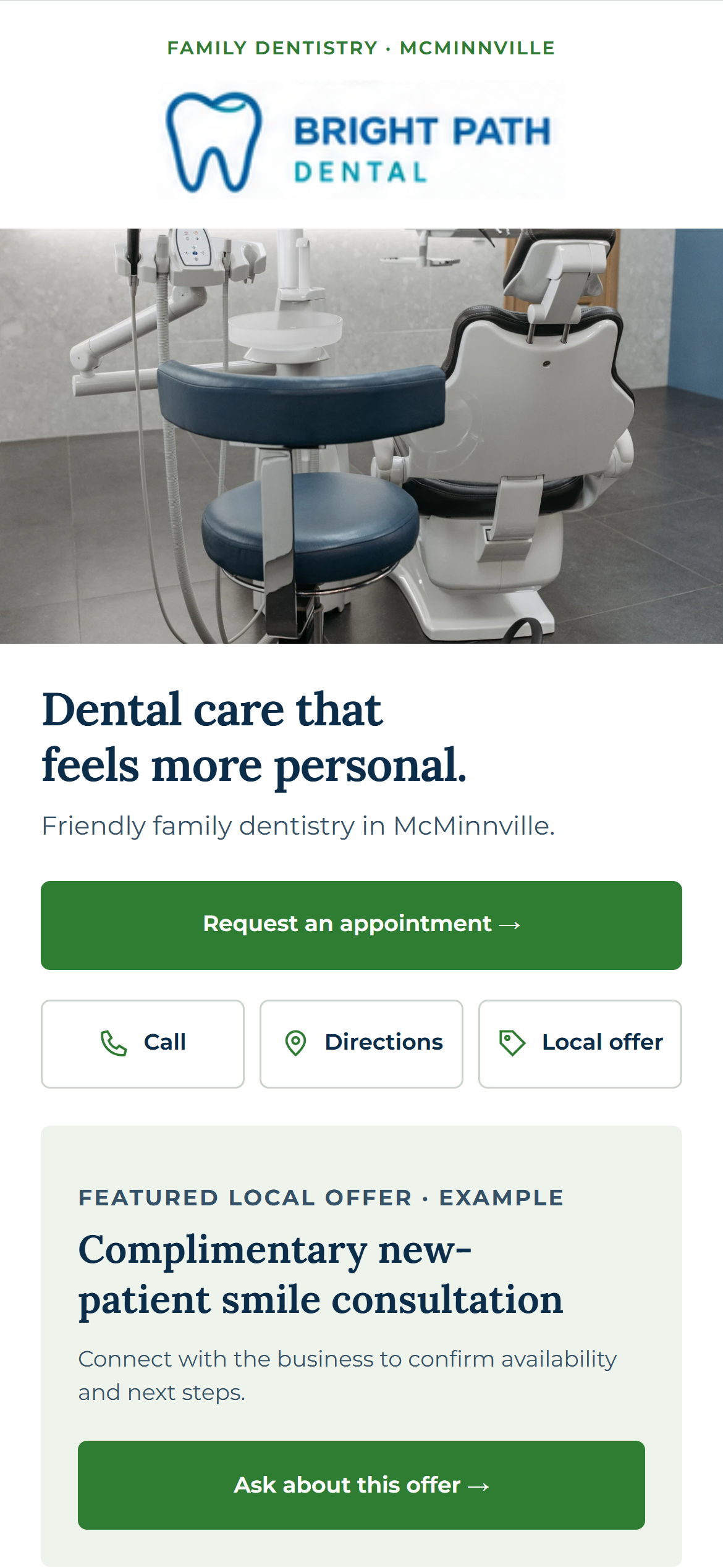
One of six board placements introduces your business. The QR-connected community experience gives customers a path to your mobile advertiser page.
- Find useful business information.
- Call or get directions.
- Explore a relevant offer or appointment path.
Final features and destinations are confirmed before activation.
Try the advertiser exampleSee how customers reach it1. Your ad in one of six positions
2. Your mobile business page
Choose the right local fit.
Then confirm the details.
Expressing interest starts a conversation. It does not purchase, reserve or activate a placement.
Tell us about your business.
Share your services, city and the local customers you want to reach.
Discuss host opportunities.
Review suitable venues, available positions and your approved category classification.
Confirm before committing.
Agree on the location, artwork, annual investment, digital scope and activation arrangements before purchase.
Questions before you sponsor.
These answers describe our planned sponsorship program. Final commercial terms are confirmed in your written advertiser agreement before signing.
Is the $50/month figure a monthly payment plan?
No. It is an equivalent cost comparison for the $600 annual sponsorship, per advertiser, per board. The full $600 is paid upfront upon signing; monthly installments are not offered.
When does my 12-month advertising term begin?
When the board is installed, your agreed advertising placement is displayed and your agreed digital destination is active. Signing, payment or an inquiry alone does not start the 12-month term.
Will another business in my category be on the board?
Your category is exclusive among the six paid advertiser positions on your board. Main & Signal determines and approves category classifications before confirming your placement. This is board-level exclusivity, not exclusivity across the whole network.
Are tabletop advertising materials included?
Yes, at participating host locations. Your sponsorship includes coordinated tabletop advertising materials, with display arrangements and quantities confirmed before purchase. Availability depends on the location; not every host has tables, and unlimited replacement materials are not included.
What happens if the host withdraws or placement is interrupted?
Main & Signal may select a reasonably comparable replacement host if the original host withdraws. Our proposed terms allow up to 30 days to restore an interrupted placement. When placement is restored, the advertising term is extended for the interrupted days. If a comparable replacement cannot be provided, the proposed remedy is a prorated refund for the unused portion. The written agreement confirms these terms before signing.
What if installation is delayed?
We target installation within 60 days of payment and host confirmation. If installation cannot occur within that period, you can request a full refund or agree to a revised installation date under the proposed commercial terms. The written agreement confirms the installation schedule and delay provisions before signing.
Can I choose my location or sponsor more than one board?
Tell us your preferred area and number of placements. We’ll discuss available host opportunities. Each board placement has its own $600 annual sponsorship; location and availability require confirmation.
What do I need to provide?
Your business information, approved branding and a clear way for interested customers to connect. We confirm the required artwork, business details and agreed digital destination before activation.
What reporting and results can I expect?
Quarterly engagement reporting is included in the planned paid program. The reporting process is not yet operating; supported digital measures and the report format will be confirmed before purchase. No live dashboard is promised. Advertising does not guarantee impressions, QR scans, leads, customer visits, sales or return on investment.
Where would you like
your business to be seen?
Tell us your city and what you offer. Let’s discuss a local placement that makes sense for you.
Ask About Advertising